

Hey there guys how are you all?
I hope you all are staying home and staying safe. This Corona- Virus Pandemic has posed a new challenge to the entire world. At this adverse and new of it kind times, the government is busy in making people stay home, health care workers are fighting as frontline soldiers, other people are busy delivering essential commodities to you at your doorstep so that you don’t know have to step out of homes and the general public is fighting the war by staying at home.
National and International conferences and gatherings have been canceled, weddings postponed, exams delayed, offices shut down and factories closed- all this had led to a huge jolt to our economy.
Well, well, well- I am not an economist who going to bore you information about the economy. (No offenses to the economist readers out there- it’s just that I find this number thing too boring to talk about).
So, let me introduce myself- I am on ophthalmologist- A health care worker but not a front line soldier at this point of time. And I am here to address all “eye-related-issues” that you and your friends have on this platform.
So- let’s talk about something. What are you all guys doing while staying home? Sleeping, cooking, board games, online video games, television, web series, movies, reading?- what all? Well, what I can guess and as per the majority of online surveys out there- This biggest chunk goes to “Web series” and “movies”.
So guys…let me ask you one more thing. Out of 24 hours a day, how much time do you spend on a “screen”?
If your answer to any of the above questions is anything like “quite a lot” more than “half of my waking time”, then this is the place for you as today I am going to talk about something known as “Computer Vision Syndrome”.
As defined by the American Academy of Ophthalmology, Computer Vision Syndrome refers to a group of eye and vision-related problems that result from prolonged computer, tablet, e-reader, and cell phone use. Symptoms experienced by long time screen users include Transient blurring of vision:
- Headache
- Brow ache
- Neck and shoulder pain
- Dry eyes
Many causes have been proposed for all these symptoms. These include:
- Poor lighting
- Glare of a digital screen
- Improper viewing distances
- Inappropriate angle of visualization
- Poor seating posture
- Uncorrected vision problems
- Decreased blink rate
- A combination of these factors
As the number of screen users has increased so has this problem.
As the screen duration has increased (one of the most important causes- “Lockdown”), this problem has increased.
And as more and more gadgets have arrived, the distance of the screen from the eyes has also reduced. Just go 20 years back in time and remember why were you scolded at home while watching TV- “Hey don’t get that close, watch from a distance!” and today you know very well how close the screens have got to our eyes. Have you ever scolded your kids for not maintaining the distance? While you have not, and you cannot. Gadgets like mobile, tablet, and laptop have been made to be held close to the eyes for getting the intended job done.
So, So, So…what to do? Well to know the solution, we need to first understand the problem. Let’s get started with that and find out how looking at the screen is different than looking on any other surface (for e.g. books)
A printed surface has a fixed contrast. The letters and figures are more defined. There are no reflecting surfaces. While a screen often offers you blurred images, poorly defined figures, altering levels of contrast, reflecting surfaces and glare. Attempts to lower the brightness also lowers the contrast so decreasing brightness provides no comfort to the eyes. All these add up and force your visual system to overwork. Your eyes and its focusing systems now need to work more to focus on a blurred image. There are only a few viewing angles where you can see the image on the screen clearly without undesired reflections. While trying to maintain that visual angle, you are forced to look into the screen in an awkward posture that leads to postural abnormalities.
Minor degrees of refractive errors of vision (low vision correctable by use of spectacles) that would have caused no symptoms while reading printed material, now pose a significant problem to the reader reading on a screen.
Treatment
While if you feel any of the above symptoms and have a recent history of prolongation of “on-screen” time, then you must consider yourself to be suffering from computer vision syndrome. Now where there is a disease, there has to be a treatment.
One of the simplest measures is to use eyeglasses. If you already use glasses, very well continue using them. But if you do not have a refractive error, you may get yourself a pair of glasses specifically for screen use. The use of glasses provides a chamber around your eyes and prevents the evaporation of tears. This helps to maintain the regularity of the surface of the eye. This is specifically important as prolonged screen duration decreases our blink rate. So, you don’t blink, your tears evaporate more and you get dry eye and you get the symptoms. Using glasses decreases the evaporation of tear film.
Besides that, there are some specific types of spectacle lenses with antireflective and antiglare coatings. Those are a great option but I won’t discuss more about it because you can’t get out to buy them in these times.
Blinking is an important mechanism of maintaining an adequate quantity and quality of tear film. With every time you blink the tear secreting gland located at the upper outer of your eye secretes tears. Also, the drainage system of the tears located inner to the inner portion of the eyes gets activated with the closure and opening of your eyelids. The normal blink rate of a human is 12 – 15 times per minute. But chronic screen users blink too less- as little as less than 5 times a day.
Screen not just decreases the quantity, but even quality of your blink leading you to blink just partially. Partial blinking does not replenish your tear film. It predisposes you to a problem known as “Meibomian Gland Dysfunction”. Meibomian glands are a set of glands that secrete oily secretions. These oils spread over the surface of the tears with blink and hence prevent evaporation of tears. Low blink rate and partial blinking decrease the activity of these glands. And hence a very poor tear quality.
So, what is the solution to this? – “Blink”.
Yes “Blink”, and blink completely. Consciously ensure that you close your whole eyelid every time you blink. A costless simple activity that can help you a lot to improve the quality of your tears and hence the quality of your vision.
The next option we have is to use over the counter lubricating eye drops. Whenever you feel any symptoms of dryness or itching in your eyes, instill one drop of the eye drop in both eyes and keep your eyes closed for a few minutes. These drops are great not only for the improvement of symptoms, but also improve the quality of tear film. You may use it as many times a day without any side effects (provided you maintain hygiene. This video explains the appropriate way to instill eye drops.
20-20-20 rule
This is a great rule to follow whenever you are using a screen. This stands for taking a 20-second break every 20 minutes of using a screen. During the break look at a distance of at least 20 feet away from you. E.g. outside a door or window.
Correct Positioning The most comfortable location of a computer screen should be about 40 to 75 cm away from the eye with the screen angulation of about
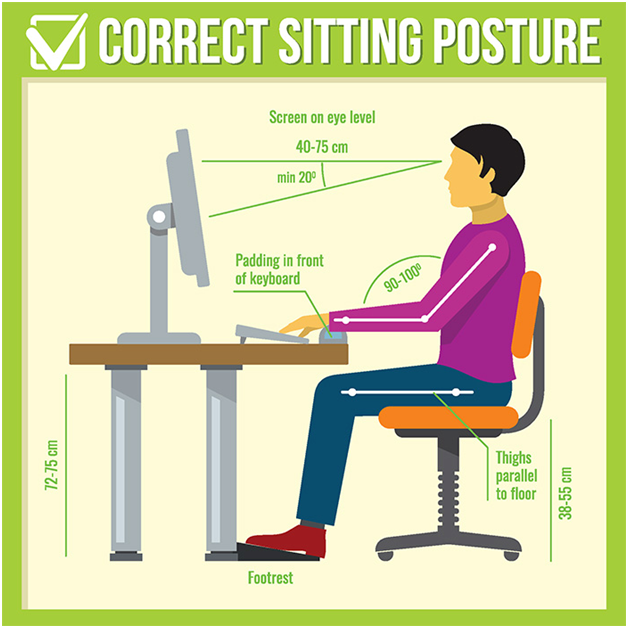
Lighting
The screen should be positioned in such a way so that glare from the reflection of overhead lighting is prevented.
Night Mode
Night mode is a wonderful feature on most of the screens that give lower glare and brightness without compromising the contrast. Hence is an excellent option for long time screen users.
Another option is anti-glare screen guards.
So these were the most important steps and small little modifications that you can make in your screen watching habits without compromising the “fun” part. And most of the aforesaid things don’t cost a penny and do not require an open shop from where you have to buy something. It’s just small habitual modifications.
So change your habits, keep watching, stay home, stay happy, stay safe.
Follow @nikhilsharma874 Follow me and let me know you’re following.
One of the most useful blogs for eye care of Software Engineers.
Awesome effort.
Very well written and useful blogs for all people who work on Computers all day